

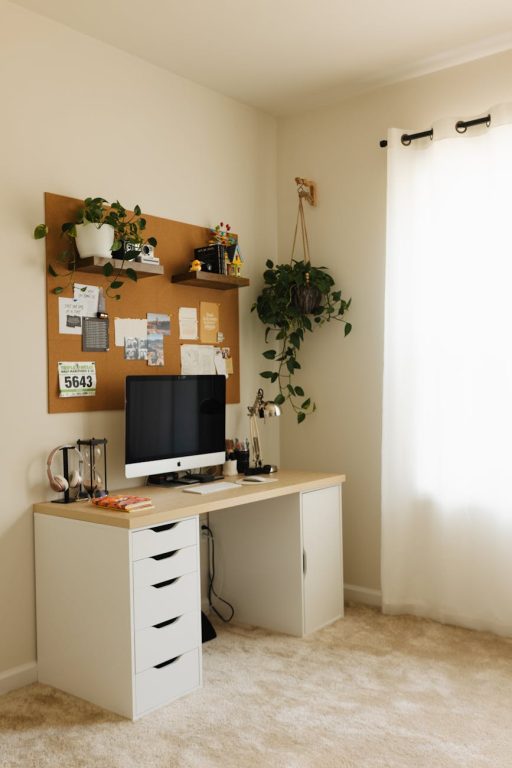
Creating a cozy and productive home workspace can significantly improve your work-from-home experience. Whether you’re freelancing, managing a home business, or attending remote meetings, having a dedicated area that feels comfortable and helps you focus makes all the difference. In this post, we’ll explore simple yet effective strategies to design a workspace that suits your needs and encourages productivity.
Why Design Your Workspace Thoughtfully?
A well-designed workspace impacts your mood, concentration, and overall work output. When your environment is cluttered or uncomfortable, it can make tasks feel more challenging and drain your motivation. Conversely, a workspace that’s inviting and organized creates a positive work mindset and helps you separate your professional time from home life.
Choose the Right Spot in Your Home
Consider Natural Light
Natural light energizes the mind and reduces eye strain. If possible, set up your workspace near a window. This not only brightens your area but also allows you to enjoy outdoor views, which can be refreshing during breaks. Avoid placing your desk directly against a window to reduce glare on your screen.
Minimize Distractions
Try to select a quiet corner or a room you can dedicate solely to work. If that’s not feasible, use room dividers or noise-canceling headphones to reduce distractions from family members or household noise.
Invest in Comfortable and Ergonomic Furniture
Ergonomic Chair
A supportive chair that encourages good posture is essential to prevent back pain during long work hours. Look for chairs with adjustable height, lumbar support, and comfortable cushioning.
Desk Selection
Choose a desk with enough surface space for your computer, notes, and essential accessories. Standing desks or adjustable desks offer flexibility to switch between sitting and standing, which can improve circulation and comfort.
Keep Your Workspace Organized
Declutter Regularly
A tidy area helps you focus and reduces stress. Limit the number of items on your desk to essentials like your computer, a notebook, and a pen holder. Use cable organizers to keep cords from tangling.
Storage Solutions
Use shelves, drawers, or storage boxes to keep supplies and documents neatly arranged. Label your storage containers to quickly find what you need without interrupting your workflow.
Add Cozy Elements
Personal Touches
Decorate your workspace with a few personal items such as a photo frame, artwork, or a small plant. These elements can make the space more inviting and boost your mood.
Soft Textiles
Include soft cushions or a cozy blanket nearby for added comfort. If your floor is hard, consider a rug to warm up the space visually and physically.
Optimize Lighting for Productivity
Layered Lighting
Combine different types of lighting: ambient (overhead), task (desk lamp), and accent (decorative lights). Task lighting near your work area ensures clear visibility without straining your eyes.
Choose Suitable Bulbs
Select bulbs that emit a soft white or daylight hue. These tones mimic natural light and help maintain alertness. Avoid harsh fluorescent lighting that can cause headaches.
Use Technology Efficiently
Wireless Accessories
Wireless keyboards, mice, and headphones reduce cable clutter and create a cleaner workspace.
Manage Screen Time
Adjust your computer’s brightness and use apps that remind you to take breaks to prevent eye fatigue. Position monitors at eye level to reduce neck strain.
Establish Boundaries and Routine
Define Work Hours
Set consistent start and finish times for your workday. This helps establish a routine and keeps work from spilling into personal time.
Communicate with Household Members
Make sure others in your home respect your workspace and working hours to minimize interruptions.
Incorporate Break Spaces
Even in a small home, designate a spot for short breaks—whether it’s a cozy chair or a stretch area. Stepping away from your desk refreshes your mind and improves concentration.
Final Thoughts
Creating a cozy and productive home workspace involves more than just placing a desk in a room. By choosing the right location, investing in ergonomic furniture, keeping your area organized, adding personal touches, and managing lighting and technology thoughtfully, you can design a workspace that supports your well-being and efficiency. Don’t forget to set boundaries and take breaks to maintain balance throughout the day.
With these tips, you’ll have a space where comfort meets productivity, making work from home a rewarding experience.